Home > Apps > Auto & Vehicles > bimmer-tool Lite
Clear fault codes and monitor DPF status for BMW vehicles
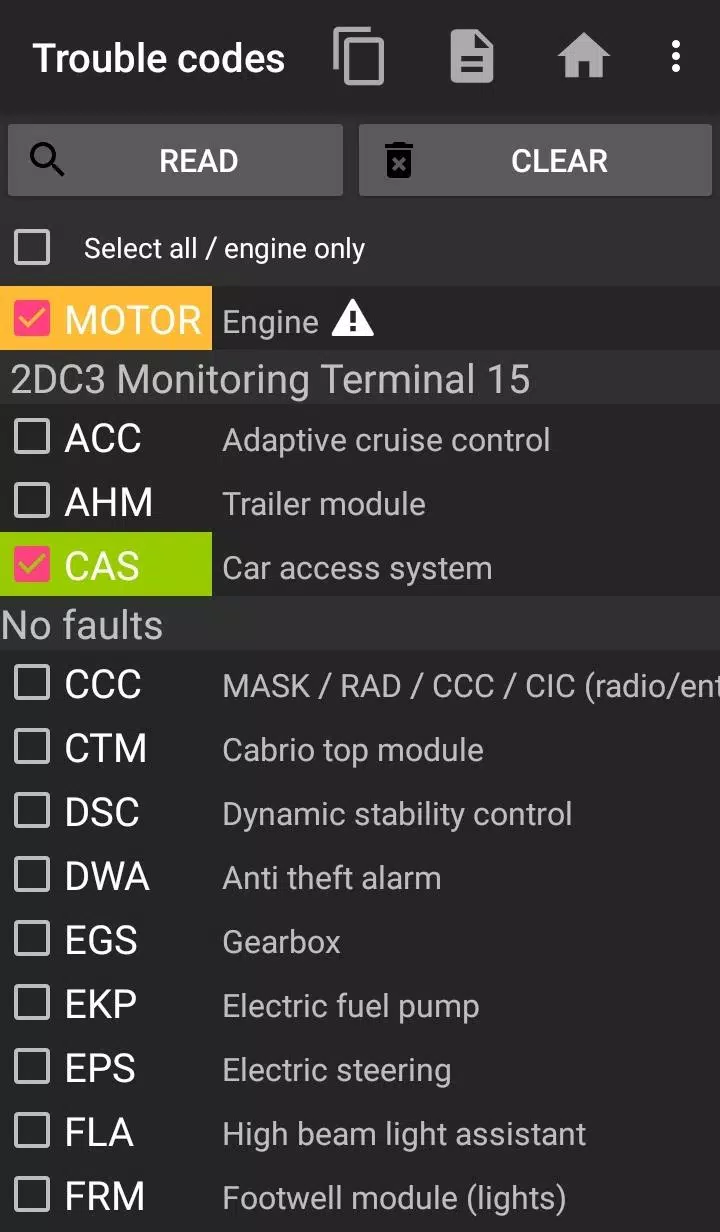
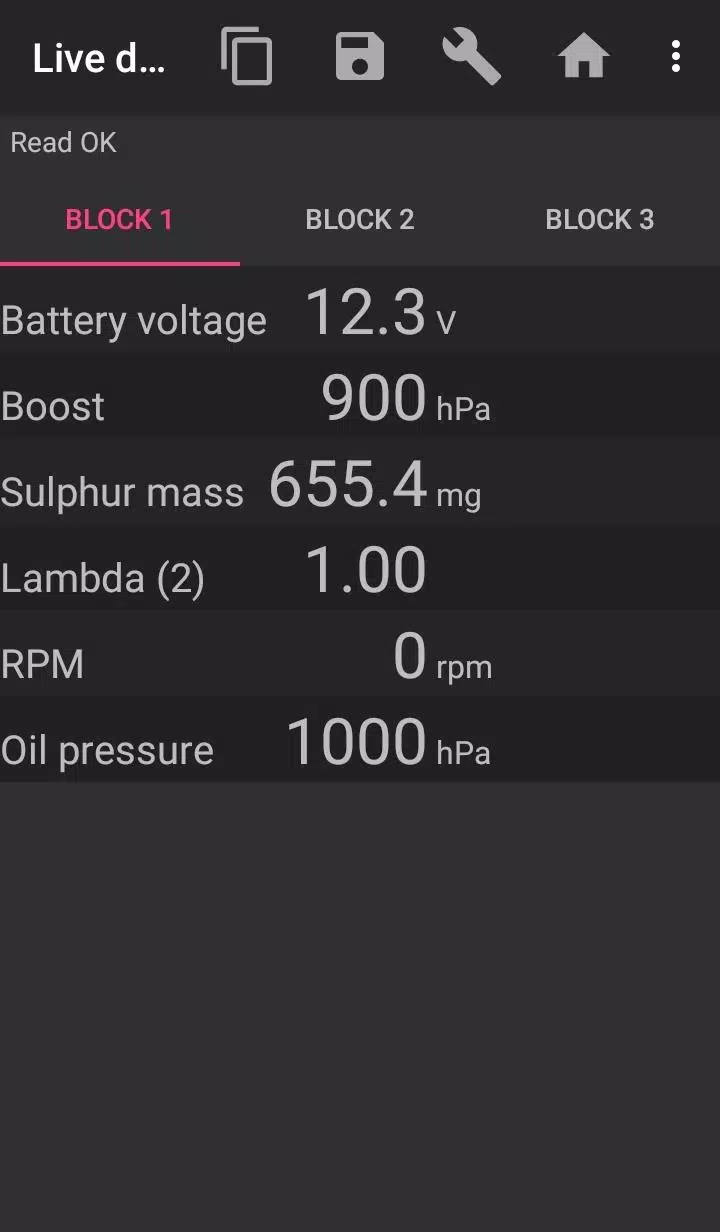
bimmer-tool enables you to read and clear fault codes, initiate DPF regeneration, access live engine data, and perform many other functions for BMW cars.
For vehicles with a model year below 2008, application functionality is limited, and a K+DCan USB cable connection is recommended. A wireless ELM adapter connection with pre-2008 models may be unavailable or have restricted features.
Important: This application requires a reliable OBD adapter. We recommend using a K+DCan cable, an ENET adapter (for F/G series), or the following Bluetooth adapters:
- Vgate vLinker MC/FS/BM/FD https://www.vgatemall.com/products/
- UniCarScan UCSI-2000/USCI-2100: Use setting: D-Can mode: MODE2 https://www.wgsoft.de/shop/obd-2-komplettsysteme/unicarscan/114/unicarscan-ucsi-2000-diagnoseadapter
https://www.bmdiag.co.uk/unicarscan-ucsi-2000-bluetooth-obd2-adapter
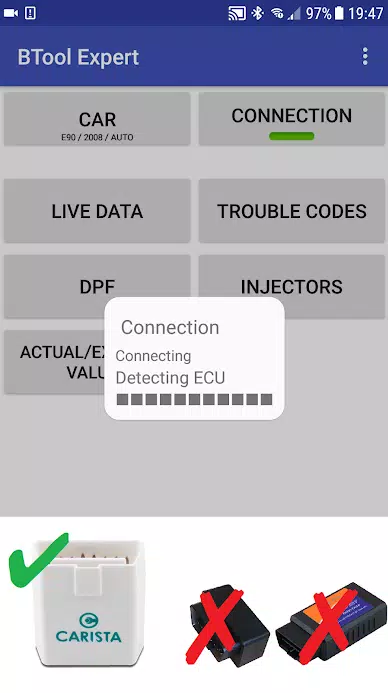
- Carista https://caristaapp.com/adapter
- Veepeak OBDCheck BLE https://www.veepeak.com/product/obdcheck-ble
The application allows you to:
- Read DPF regeneration status and access detailed information
- Request DPF regeneration
- Reset DPF adaptation values (necessary after filter replacement)
- Read exhaust gas pressure
- Read injector adjustments
- Read actual and expected values for air mass, intake manifold pressure, and fuel pressure
- Log data to a CSV file for further analysis
- Register a battery replacement (without modifying battery properties)
- Reset lamp circuits blocked due to a short-circuit error
- Reset oil and brake service intervals**
Supported OBD Adapters
- K+D-Can USB: This is the recommended and most reliable adapter. You will also need a USB-OTG cable.
- ENET Cable/Wi-Fi Adapter: Recommended for F & G series. For ENET cable connections, you additionally need a USB-C to Ethernet adapter.
- ELM327 Bluetooth: Bluetooth connections may be slower than USB. Only genuine ELM327 or PIC18-based adapters will work. It may not be compatible with older engines. More information below.
- ELM327 Wi-Fi: Similar to ELM Bluetooth, this connection may be less stable. On some devices, you must disable mobile data transmission to use the Wi-Fi adapter.
If you have questions or need assistance, please send an email. You can find our address at the bottom of the page.
Quick Start Guide
1) Connect the adapter to the OBD II socket.
2) Turn the ignition on.
3) Connect the adapter to your phone:
* USB: Connect the adapter to your phone using a USB-OTG cable. Your phone will ask which app to launch—select the bimmer-tool app.
* Bluetooth: Go to your phone's Bluetooth settings. Search for devices and pair with the adapter (the PIN is usually 0000 or 1234).
* Wi-Fi: Turn off mobile data. Enable Wi-Fi and search for available networks. Connect your phone to the adapter's Wi-Fi network.
4) Start the app, go to the 'Car' section, and select your model and year.
5) Go to 'Connection' and choose the connection type, adapter type, and communication protocol.
6) Tap the 'Connect' button.
**Limitations:
For models below 2008 and e46/e39/e83/e53, the app requires a K+DCan cable connection and only supports the engine ECU. A connection using a wireless ELM adapter may not be possible.
Common Problems
- 'No response' error from the engine in cars up to 2007 when using a BT/Wi-Fi adapter. If this error occurs intermittently, try selecting the ATWM option under advanced connection settings.
- No connection: If your adapter and protocol settings are correct but the app still cannot connect to the car, try forcing all diagnostic applications to stop in your application manager (including bimmer-tool) or restart your phone and try again.
Why does this app require permissions?
- Storage: Required for USB adapter support.
- Photos / Media / Files: Allows the creation of CSV files.
- Pair with Bluetooth devices / access Bluetooth settings: Required for Bluetooth adapter support.
- Full network access: Required for Wi-Fi adapter support.
- Approximate location: In theory, location can be approximated via Bluetooth, but this app does not read or use location data.
What's New in the Latest Version 3.7.6-L
Last updated on Nov 10, 2024
Diesel idle speed adjustment
Throttle body control
Additional Game Information
Latest Version3.7.6 |
Category |
Requires AndroidAndroid 4.2+ |
Available on
|

bimmer-tool Lite Screenshots







Trending apps
-

- Shopee TW
- 4.2 Photography
- Shopee TW, the Taiwanese branch of the popular Shopee e-commerce platform, provides a vast selection of goods encompassing electronics, apparel, home furnishings, and beauty products. Users can explore diverse categories, benefit from exclusive promotions, and participate in flash sales. The platf
-

- EL PAÍS
- 4.2 News & Magazines
- Experience the world through the lens of EL PAÍS, a globally renowned magazine boasting over 65 million subscribers. This app delivers a comprehensive news and entertainment experience, featuring in-depth reporting, innovative storytelling, and unparalleled access. Explore a vast library of article
-
- Gradient: AI Photo Editor
- 4 Photography
- Welcome to Gradient: AI Photo Editor, the ultimate app designed to unleash your creativity and transform your photos and videos in ways you never imagined. Powered by state-of-the-art AI technology, our app provides a wide range of innovative features that will both amaze and inspire you. Discover y
-

- BanFlix
- 4.1 Lifestyle
- In today's world of ever-increasing entertainment demands, accessing high-quality content is simpler than ever thanks to technological advancements. BanFlix APK delivers a premium global entertainment experience. Here's What You'll Find in This Application: Diverse server optionsHigh-speed download
-

- Chatiw! Meet,Chat & Dating
- 4.1 Communication
- Chatiw is a free chat platform connecting you with strangers in chat rooms. Message anyone directly—no friend requests needed. Discover diverse cultures and languages, and chat with singles worldwide without registration. Explore Chatiw's Outstanding Features! Free Mobile Chat: Seamless Conversati
-

- Duolingo
- 4.3 Education
- The **Duolingo APK**, developed by Duolingo Inc., stands as a premier choice for language learning, transforming your Android device into a hub of linguistic diversity. Directly accessible through Google Play, Duolingo offers an interactive learning experience tailored to the dynamic lifestyles of t
Latest APP
-

- Tyresure NFC
- 4.4 Auto & Vehicles
- TyreSure NFC-Enabled TPMS Sensor Programmer App Fundamentals Superfast ConfigurationConfigure a Hybrid NFC sensor with a single tap. It’s as quick and easy as making a contactless payment. Zero InterferenceNo need to worry about distur
-
- Генератор номеров
- 5.0 Auto & Vehicles
- Test your fortune and eliminate the thieves' quota in the refreshed clicker game! This is an upgraded iteration of the most straightforward number-generating clicker. It now features enhanced visuals, animations, special effects, a diverse collection
-

- OBD WiFi Connect
- 3.4 Auto & Vehicles
- This application facilitates connecting your Remote VCI to your workshop's Wi-Fi network. Specially engineered for this purpose, the app guides you through linking your Remote VCI to the local wireless connection. It offers a clear, step-by-step proc
-
- E-CAR Gọi xe ô tô điện
- 4.3 Auto & Vehicles
- E-CAR: Your eco-friendly electric vehicle booking app. Green, affordable, and hassle-free travel solutions.E-CAR | Vietnam's leading rental platform for motorbikes and electric vehicles, including 5-seaters and 7-seatersVisit us at: https://e-car.vn-
-

- 현대/제네시스 인증중고차
- 3.9 Auto & Vehicles
- Crafted by Hyundai, Trusted by You. Hyundai Certified offers a reliable and transparent pre-owned vehicle program backed by Hyundai Motor Company's expertise.Crafted by Hyundai, Trusted by You. Hyundai CertifiedA trustworthy used car certification pr
-

- Park+
- 5.0 Auto & Vehicles
- Enjoy hassle-free unlimited parking, FASTag purchases & recharges, instant vehicle challan checks, RTO services, and mParivahan accessPark+ is India's leading vehicle super app, trusted by 10 million+ car owners. Manage every automotive need effortle
-

- Go Green City
- 3.8 Auto & Vehicles
- GGC delivers smart, on-demand e-mobility solutions across Switzerland. Drive intelligently. Travel safely. Embrace sustainability. We collaborate with municipalities to create smart mobility ecosystems that champion energy conservation. That's why o
-
- RHG ENERTÜRK
- 4.0 Auto & Vehicles
- RHG Enertürk EV Charger AppRHG Enertürk EV Charging ApplicationWhat's New in the Latest Version 4.21.0Last updated on Nov 10, 2024This version includes bug fixes and performance improvements for a better experience. We continue working on new feature
-

- Bus marshrutochka.bel
- 4.5 Auto & Vehicles
- Ticket Booking Application Book passenger transport tickets for routes: Minsk–Smorgon–Ostrovets and Minsk–Oshmyany–Ostrovets What's New in the Latest Version 1.0.1Last updated on Nov 10, 2024Minor bug fixes and performance enhancements. Install o